Getting Started in BloxNG
Your first hour in Deform Dynamics soft-body crash sim - from join to first spectacular wreck.
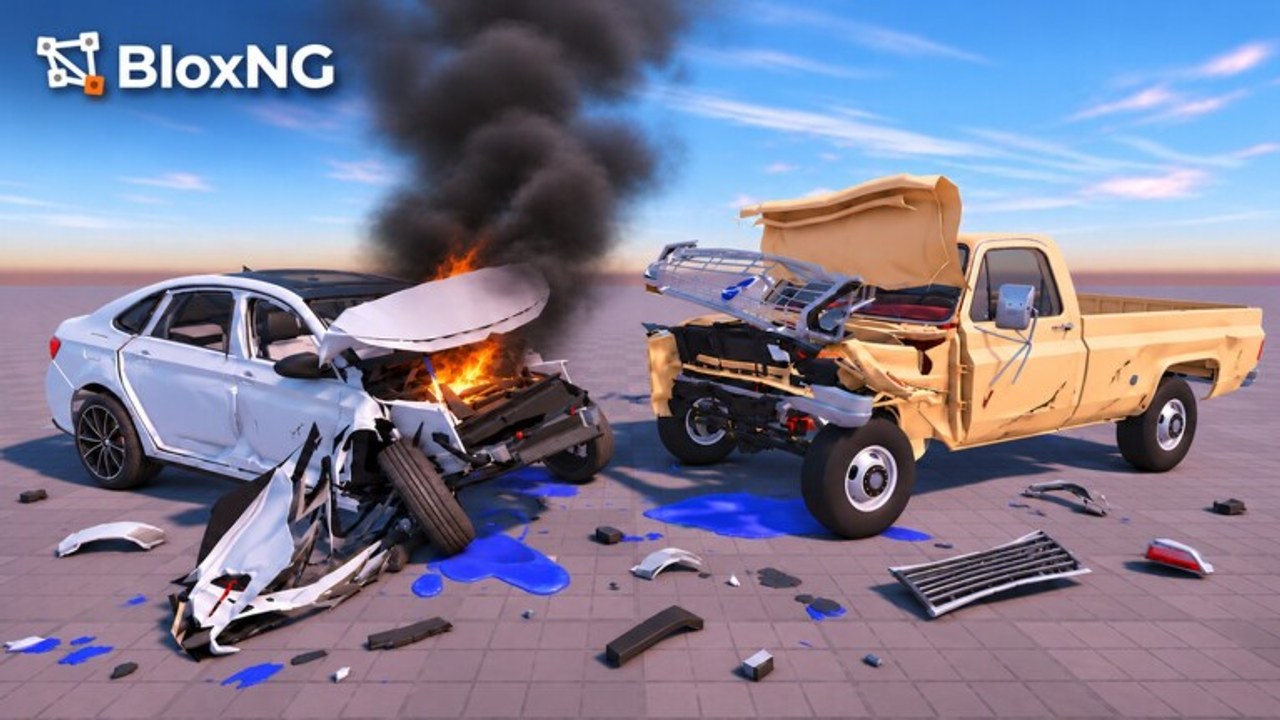
BloxNG [CRASH PHYSICS] by Deform Dynamics is a Roblox soft-body vehicle crash simulator still marked beta. You can play on the official experience page with friends on Desktop, Mobile, Tablet, or Console in servers of up to 10 players. This getting-started guide walks through your first session: what the game is, how to join cleanly, what to practice first, and which wiki pages to open next.
If you only remember three ideas from day one, make them these: speed, angle, and weight shape every crash; soft-body metal crumples where you hit; and the beta loop rewards crashing, earning, and unlocking more chaos. For a visual overview of the experience, watch the embedded video mid-page, then come back to the checklist below.
What you are playing
BloxNG focuses on realistic crash physics rather than pure racing leaderboards. Soft-body deformation means panels fold at the impact point instead of vanishing. Wheels can snap. Doors hang. Glass shatters. Engines, tyres, and smaller parts can fail. That spectacle is the product. Community stats around the wiki snapshot window sit near ~2.4M visits, ~10k favorites, high concurrent players, and roughly 93% likes - useful social proof that the beta already feels great to smash around in.
Because it is beta, treat tutorials and HUD labels as flexible. A button that sits top-right today might move after Update 1 or the Mystery Update window. Physics principles stay more stable than menu chrome, so prioritize learning impacts over memorizing every icon.
Day-one join checklist
- Open Roblox on your preferred device and launch BloxNG from the official game link above.
- Favor the experience so updates and events surface in your feed.
- Join a server (max 10). If a lobby is chaotic, hop once for a quieter practice space.
- Spawn or select a starter vehicle and take a short shake-down drive without crashing - feel throttle and steering.
- Plan a low-speed first impact into a wall or curb to see crumple feedback without totaling the car instantly.
- Increase speed gradually and change approach angle; note how deformation follows the contact point.
- After a few wrecks, open Earn Cash ideas so progression goals are clear.
- Join the Discord for patch talk and etiquette tips from Players.
First skills to practice
Throttle discipline. Soft-body sims punish (and reward) excess speed. A medium-speed T-bone often looks better than a full-boost pancake if you care about readable crumples.
Angle awareness. Glancing blows scrape panels; square hits fold them. Practice 30, 45, and 90 degree approaches into the same obstacle so you learn the visual language of impact.
Weight and vehicle choice. Heavier bodies transfer force differently than light cars. Even in beta, switching vehicles teaches how mass changes outcomes - useful before you spend cash on unlocks.
Camera control. Keep the impact in frame. On desktop, adjust camera before the hit; on mobile, reset touch camera after sharp turns. See the full Controls page for platform-specific habits.
Part failure reading. Watch for snapped wheels, hanging doors, shattered glass, and engine or tyre damage. Those cues tell you whether the soft-body system registered a clean hit. Deep dive on Crash Physics.
Platform notes for new players
Desktop players usually get the tightest steering feel with WASD or arrow keys and mouse camera. Use that precision for angle practice.
Mobile / Tablet players should expect on-screen drive controls and touch camera. Take wider turns before crashes so you are not fighting the UI mid-impact. UI may shift in beta builds.
Console players should map comfort settings early: invert camera if needed, lower sensitivity until crash timing feels predictable, then raise it for freestyle sessions.
All platforms share the same soft-body rules. If a friend on another device describes a different menu path, compare notes - beta patches can desync UI copy briefly.
Your first progression loop
Think of the beta economy as: crash then earn then unlock more chaos. Spectacular wrecks and completed runs feed cash or score that unlocks better cars or toys for bigger impacts. Exact numbers change with patches, so treat wiki tips as strategy, not a fixed price list. When Update 1 new map and airbags are live, explore the fresh space carefully before farming at full speed.
Use the Impact Checklist before showcase crashes you want to clip. For official destinations and community hubs, bookmark Official Links. Patch history lives under Updates.
Common day-one mistakes
- Flooring it into the first wall and learning nothing from the mush of parts.
- Ignoring angle - every crash looking the same because approach never changes.
- Fighting other players in the 10-slot server instead of sharing cool wreck moments.
- Skipping Discord and missing Mystery Update timing (Nov 13-20 2026, 12:00 PM ET window on the calendar).
- Assuming UI labels are permanent while the game is still beta.
After your first hour
Graduate to Crash Physics for technique depth, keep Controls open while you switch devices, and plan cash goals with Earn Cash. When you are ready for community norms, read Players and invite friends via Discord. Come back to this getting-started page after major patches to refresh the join flow.
Drive safe until you choose not to - then crumple with intent.
Frequently Asked Questions
Quick answers for BloxNG crash physics, codes, scripts, and updates.
Is BloxNG free to play on Roblox?
Yes. Launch it from the official Roblox experience page. Optional purchases may appear in beta, but soft-body crashing itself is available once you join.
What platforms does BloxNG support?
Desktop, Mobile, Tablet, and Console. Servers hold up to 10 players. Controls differ by device - see the Controls guide.
What should I do in my first session?
Favor the game, take a short non-crash drive, then practice low-speed impacts while changing angle and speed. Review Crash Physics after a few wrecks.
Where do I get updates and community news?
Check the Updates Hub for Mystery Update and Update 1 notes, and join the Discord page linked from Players and Official Links.
Why does the UI look different from this guide?
BloxNG is in beta. Menus can move after patches. Trust physics tips first, then re-check in-game labels after each update.